Synthesia is one of the most popular AI video generators for business users, especially for training videos, onboarding, internal communication, and multilingual content.
But I did not want to write another generic Synthesia review based only on feature lists.
So I tested Synthesia by creating a short workplace safety training video from a simple script. In this review, I will show the actual test process, screenshots, the final video example, what worked well, what felt limited, and who I think Synthesia is actually best for.
If you want to test the platform yourself, you can try Synthesia here.
Quick Verdict: Is Synthesia Worth It?
Synthesia is worth it if you need repeatable business videos, especially for training, onboarding, product explainers, internal communication, and multilingual video content.
It is not the best choice if you want cinematic AI videos, viral TikTok-style clips, YouTube entertainment content, or highly emotional storytelling.
After testing it, my view is simple: Synthesia is not trying to replace creative video production. It is trying to replace repetitive business video production.
Synthesia is not trying to replace creative video production. It is trying to replace repetitive business video production.
Why I Tested Synthesia
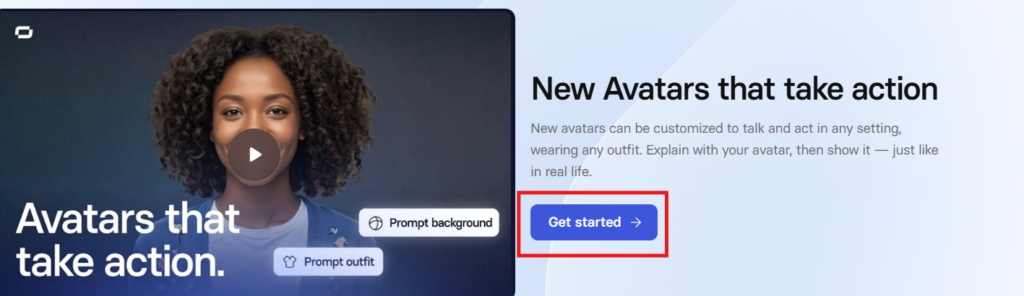
I chose Synthesia because it is clearly positioned as an AI video platform for business. The official website says it helps users create videos with AI avatars and voiceovers in 160+ languages, and its pricing page includes plans such as Basic, Starter, Creator, and Enterprise. :contentReference[oaicite:0]{index=0}
That makes it different from general AI video generators. I wanted to test whether it could actually produce a useful business training video, not just a good-looking demo.
My Synthesia Test: Creating a Workplace Safety Training Video
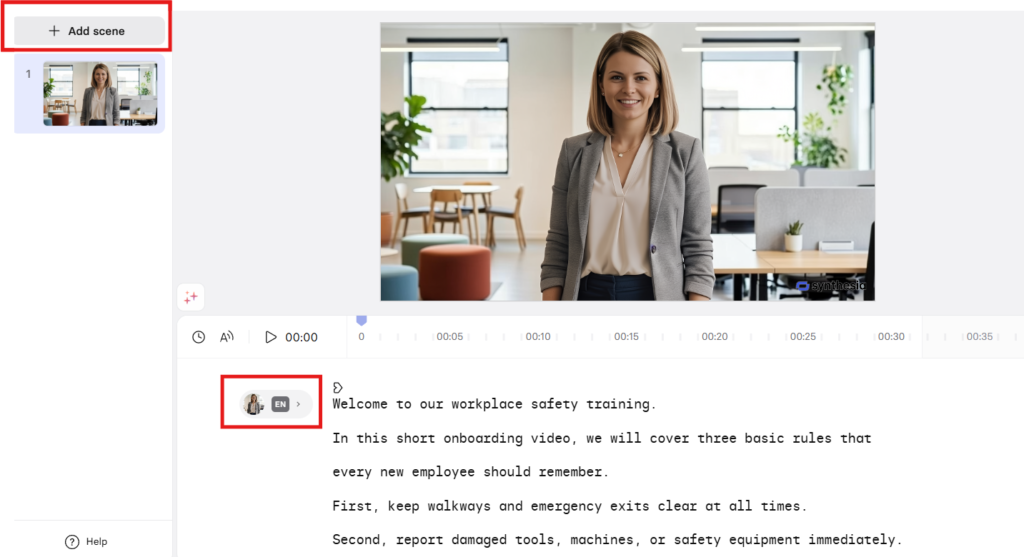
For this Synthesia review, I created a short employee onboarding video about workplace safety.
The goal was simple: can Synthesia turn a basic business training script into a professional-looking AI avatar video without filming, hiring actors, recording voiceovers, or editing manually?
Test Script
Welcome to our workplace safety training.
In this short onboarding video, we will cover three basic rules that every new employee should remember.
First, keep walkways and emergency exits clear at all times.
Second, report damaged tools, machines, or safety equipment immediately.
Third, wear the required protective gear when working in designated areas.
These simple habits help prevent accidents and create a safer workplace for everyone.
Thank you for watching, and welcome to the team.
Watch My Synthesia Test Video
Below is the short AI training video I created with Synthesia for this review. I used a simple workplace safety script to test the avatar quality, voice clarity, ease of use, and whether the final result felt usable for business training.👇
What Worked Well in My Test
The strongest part of Synthesia was how quickly it turned a simple script into a complete avatar video.
I did not need a camera, microphone, actor, studio, or editing timeline. The workflow was close to writing a script, choosing an avatar, selecting a scene style, and generating the video.
For a short internal training video, the result was good enough to feel practical. It still looked like an AI avatar video, but for standardized business communication, that may be acceptable.
The workflow was beginner-friendly
The interface felt simple enough for a non-video editor. The main task was writing a clear script and choosing the right avatar and scene style.
The avatar looked professional
The avatar did not feel like a real human presenter, but it looked professional enough for an internal training or onboarding video.
The voice was clear
For business training, clarity matters more than dramatic emotion. In this test, the voice was clear enough for a short workplace safety video.
The result matched the business use case
This is where Synthesia made the most sense. The output worked better as a training or onboarding asset than as creative entertainment content.
What Felt Limited
Synthesia is useful, but it is not perfect.
The biggest limitation is that the final video still feels like an AI avatar video. That is not necessarily a problem for training, onboarding, or internal communication. But it may be a problem if you need emotional storytelling, cinematic visuals, or creator-style social content.
1. It is not ideal for cinematic videos
If your goal is film-style AI video generation, Synthesia is not the tool I would choose first.
2. It may feel too corporate for creators
For YouTubers, TikTok creators, or short-form content creators, Synthesia may feel too structured and business-oriented.
3. Downloading the video may require a paid plan
In my test, the preview looked good, but downloading the final video required a paid plan
Synthesia Pricing: Is It Worth Paying For?
Synthesia offers multiple plans, including Basic, Starter, Creator, and Enterprise. The right plan depends mainly on how many video minutes, editors, guests, avatars, and enterprise features you need. :contentReference[oaicite:1]{index=1}

Based on my test, I would not judge Synthesia only by its monthly price. The better question is whether it can replace repeated filming, voiceover recording, translation, and editing work.

For occasional creative videos, it may feel expensive. For teams that regularly create training, onboarding, sales enablement, or multilingual internal videos, the value is easier to justify.

Who Should Use Synthesia?
Synthesia is a strong fit for:
- Employee training teams
- HR and onboarding teams
- Internal communication teams
- B2B product marketing teams
- SaaS companies creating product explainers
- Global teams that need multilingual videos
- Businesses that want repeatable video production without filming people
Who Should Skip Synthesia?
Synthesia is probably not the best fit for:
- YouTubers who need entertainment-style videos
- TikTok or Reels creators
- Users who want cinematic AI video generation
- People who need highly emotional human performance
- Users who only need one or two low-cost videos
Synthesia vs Other AI Video Generators
Synthesia is best understood as a business AI video platform, not a general creative video generator.
If you need avatar-based training, onboarding, internal communication, or multilingual business videos, Synthesia is a strong option.
If you need cinematic AI visuals, tools like Runway may make more sense. If you need social media templates and marketing clips, InVideo may be a better fit. If you need personalized avatar marketing videos, HeyGen may also be worth comparing.
Final Verdict: Is Synthesia Worth It in 2026?
After testing Synthesia with a real workplace safety training script, my verdict is clear: Synthesia is worth considering if video is a repeated business communication problem for your team.
It is not the best AI video generator for every creator. But for training, onboarding, internal communication, product explainers, and multilingual business videos, it does exactly what many teams need: it turns scripts into usable videos without cameras, actors, microphones, or traditional editing.
If you want cinematic video, skip it. If you want repeatable business video production, Synthesia is one of the first tools I would test.
You can try Synthesia here and create your own AI business video.
FAQ
Is Synthesia good for business training videos?
Yes. Based on my test, Synthesia works well for simple business training, onboarding, and internal communication videos. It is especially useful when the content is script-based and repeatable.
Can Synthesia replace a real video production team?
Not completely. Synthesia is better for repeatable business videos than for emotional storytelling, cinematic production, or high-end brand campaigns.
Can I use Synthesia without downloading the video?
Yes, you can use a public share link or embed code, depending on your plan and sharing settings. In my test, downloading required a paid plan, but sharing the video was still possible.
Is Synthesia good for YouTube creators?
Not usually. Synthesia can be useful for explainers, but it is not the best fit for entertainment-style YouTube videos, cinematic content, or personality-driven creator content.
What is Synthesia best for?
Synthesia is best for business training, onboarding, internal communication, product explainers, sales enablement, and multilingual business video production.